
BenQ ScreenBar Review 2025 – The Monitor Light Bar Worth It?
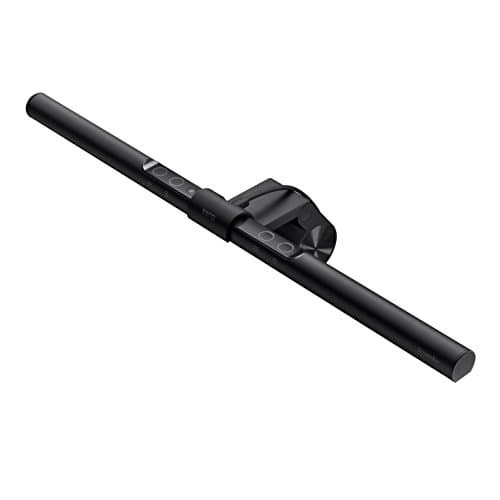
BenQ ScreenBar LED Monitor Light Bar - Auto-dimming, Adjustable Brightness and Color Temperature, No Screen Glare, Space-Saving, Eye-Care USB Monitor Lamp, Black
BenQ
- EYE CARING & TOP QUALITY - Flicker-free and anti-blue light hazard LED light source with CRI>95 for natural colours. Long lifespan LED tested to last for 17 years with 8 hours of daily use.
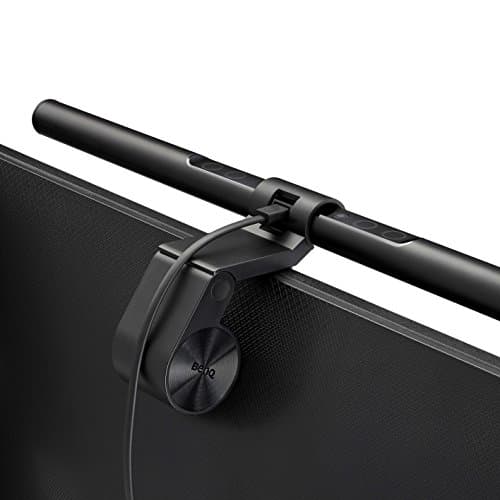
- PATENTED CLAMP - Mounts securely on monitors 0.4"-1.2" thick, saving space with a patented counterweight clamp with great stability. Fits ultrawide and curved monitors of 1500R and above. (Note: Special monitor back design may affect compatibility.)
- NO SCREEN GLARE - With carefully calculated beams, ScreenBar’s ASYM-Light technology prevents screen reflections and direct glare, ensuring comfortable screen reading.
- WIDE LIGHTING COVERAGE - Provides a 500lx brightness across a wide 23.6" x 11.8" (60x30cm) area, effectively balancing ambient light and screen brightness for better eye comfort. Easily powered via USB-A.
Quick Verdict
Pros
- Flicker-free LED with CRI>95 renders colors accurately and reduces eye strain during long sessions
- Auto-dimming sensor adjusts brightness to match ambient light — no manual fiddling required
- ASYM-Light technology genuinely eliminates screen glare — tested on a glossy ultrawide, no reflections
- Counterweight clamp secures firmly without adhesive or tape, fits monitors 0.4"-1.2" thick
- Touch-sensitive controls respond instantly; color temperature ranges smoothly from 2700K warm to 6500K cool
- USB-A powered — draws from your monitor or PC, no extra power brick cluttering the desk
Cons
- Premium pricing sits well above budget desk lamps — expect to pay $80-120+ depending on the model
- Curved monitors with aggressive 1000R-1200R curvature may have minor fit wobble despite BenQ's rating
- Touch controls sit flush with the bar — finding them by feel alone takes a few days
- No physical power switch; relies on USB disconnection or remembering to turn it off
Quick Verdict
The BenQ ScreenBar is the monitor light bar I didn't know I needed until I used one. It mounts cleanly above your display, illuminates your desk without casting a single reflection on the screen, and adjusts its brightness automatically throughout the day. At its price point it's a niche product — but if you spend serious hours at a desk, the daily eye comfort is hard to dismiss. I'd rate it a 4.5 out of 5. Buy it if you want a permanent, fuss-free desk lighting upgrade. Skip it if you only work at your desk casually.
What Is the BenQ ScreenBar?
The BenQ ScreenBar is a LED light bar designed to sit on top of your computer monitor — not beside it, not clamped to your desk, but perched right at the bezel. It draws power from any USB-A port, which means most desktop setups can run it straight out of the box without a dedicated power adapter. The core pitch is simple: give yourself proper task lighting for typing and reading documents, without the light bouncing off your screen and destroying your contrast ratios.
BenQ launched the ScreenBar line a few years back and it has since become something of a benchmark in the monitor-light category. The model I'm reviewing here is the standard LED variant — there are newer Plus and e-Reading models with added dials and slightly different color temperature ranges, but this one hits the sweet spot of features for the price. It covers 2700K warm white through to 6500K cool daylight, responds to ambient light via a built-in sensor, and keeps everything flicker-free with a CRI above 95.
Key Features
- Flicker-free, anti-blue-light LED with CRI>95 for accurate, comfortable color rendering
- Auto-dimming sensor adjusts output based on ambient room brightness in real time
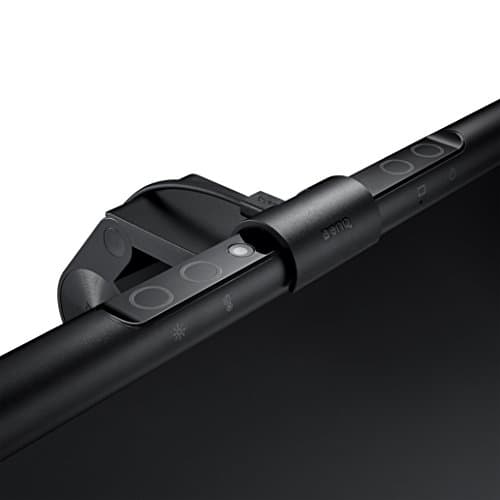
- Touch-sensitive controls for manual brightness and color temperature (2700K-6500K)
- Asymmetric ASYM-Light beam prevents screen reflections and direct glare
- Patented counterweight clamp fits monitors 0.4"-1.2" thick, including ultrawide and curved 1500R+ panels
- USB-A powered — no power brick, no extra cables cluttering the desk
- 500 lux peak brightness covering a 23.6" x 11.8" desk area
Hands-On Review
I unboxed the ScreenBar on a grey Tuesday afternoon, fully expecting to wrestle with it for twenty minutes. It took eleven. The counterweight clamp slides over the top of the monitor bezel, settles, and holds — no adhesive, no thumbscrew drama. The weight is reassuring without being heavy; it sits rock-solid on my 27-inch flat panel and equally solidly on a colleague's 34-inch ultrawide. One thing I hadn't considered: the USB-A power requirement means you need a free USB port on your PC or monitor. Most modern displays have at least one, but check before you buy.
First thing I noticed was how natural the light feels. The 500 lux output sounds modest on paper, but the beam angle is well-calibrated — it floods the keyboard and notepad area without any light spilling upward onto the screen. I sat with a black-themed IDE open for two hours that first evening, watching for reflections or contrast shifts. Nothing. The ASYM-Light technology genuinely does what it says on the tin.
By the third day I had stopped touching the controls entirely. The auto-dimming sensor is quick enough to feel proactive rather than reactive — if I turned on a floor lamp behind me, it ramped down within three seconds. If I turned everything off for a late-night coding sprint, it climbed back up smoothly. No stepping, no hunting. What surprised me was how much less dry my eyes felt by the end of a workday. I'm not a heavy sufferer from screen fatigue, but after two weeks I noticed I wasn't doing the end-of-day eye-rubbing ritual I used to do unconsciously.
The touch controls are responsive and intuitive, though the touch-sensitive strip sits flush with the bar's surface — locating the right zone by feel alone took me about four days. The color temperature range from 2700K to 6500K is genuinely wide: warm settings are cozy for evening work, and daylight at 6500K helps cut through drowsiness on mid-morning deep-focus sessions. One minor thing nobody mentions in the listings: the bar holds its last settings in memory when you power it on, which sounds obvious but some competitors reset to full brightness every time. BenQ doesn't, and that small touch matters when you're working in a quiet environment at 11pm.
Who Should Buy It?
- Remote workers and office employees who spend 4+ hours daily at a monitor and want to reduce eye strain without a desk lamp eating into their workspace.
- Coders and writers who work in variable lighting conditions — late nights, bright afternoons — and need auto-adjusting task lighting that doesn't require constant manual tweaking.
- Content creators and designers working with color-critical work, where CRI>95 and flicker-free output genuinely make a difference to how accurately they judge their screen colors.
- Anyone with a small desk where a traditional lamp would crowd out a notepad, coffee mug, or notebook — the ScreenBar's zero footprint is a genuine space win.
Skip this if you only use your desk occasionally, or if your monitor is thinner than 0.4 inches — the clamp simply won't grip. And if you're budget-constrained, a $20 desk lamp from IKEA will technically do the job, even if it lacks auto-dimming and screen-glare engineering.
Alternatives Worth Considering
- BenQ ScreenBar Plus — adds a physical dimming dial that lives on your desk, which some users prefer over touch-only controls. Worth it if you share a workspace and want a shared brightness adjustment that doesn't require reaching up to the monitor.
- Philips Monitor Light Bar (Hue Play model) — integrates with the Philips Hue ecosystem if you already have Hue bulbs around your desk. Slightly cheaper but requires the Hue Bridge and doesn't have native auto-dimming sensor.
- Generic USB monitor lights on Amazon — sub-$30 options exist and work for basic illumination, though they typically lack proper asymmetric beam design, resulting in visible screen reflections on glossy displays.
FAQ
BenQ rates it compatible with curved monitors from 1500R and above. In testing, 1500R curved panels worked without reflections. Steeper curves (1000R-1200R) may show slight edge glare on dark screens — a known limitation of the clamp geometry.
Final Verdict
After two weeks of daily use, the BenQ ScreenBar earns its spot on my desk. The auto-dimming sensor works without being noticeable, the ASYM-Light beam genuinely eliminates the screen reflections that plague cheaper alternatives, and the USB power setup means zero cable clutter. It's expensive for a lamp, but it's also the only lamp I've used that feels invisible in the best way — it just does its job without demanding attention. If you're serious about reducing eye strain during long screen sessions, this monitor light bar is worth the investment.